> ## Documentation Index
> Fetch the complete documentation index at: https://docs.fentufsm.com/llms.txt
> Use this file to discover all available pages before exploring further.
# Introduction to Fentu Connect
> Fentu Connect is an integration platform that synchronizes data between Fentu FSM and external systems like SAP B1, Salesforce, and more.
## Overview
Fentu Connect is a powerful middleware application that enables seamless data synchronization between Fentu FSM (Field Service Management) and various external systems including ERP platforms, CRM systems, and other business applications.
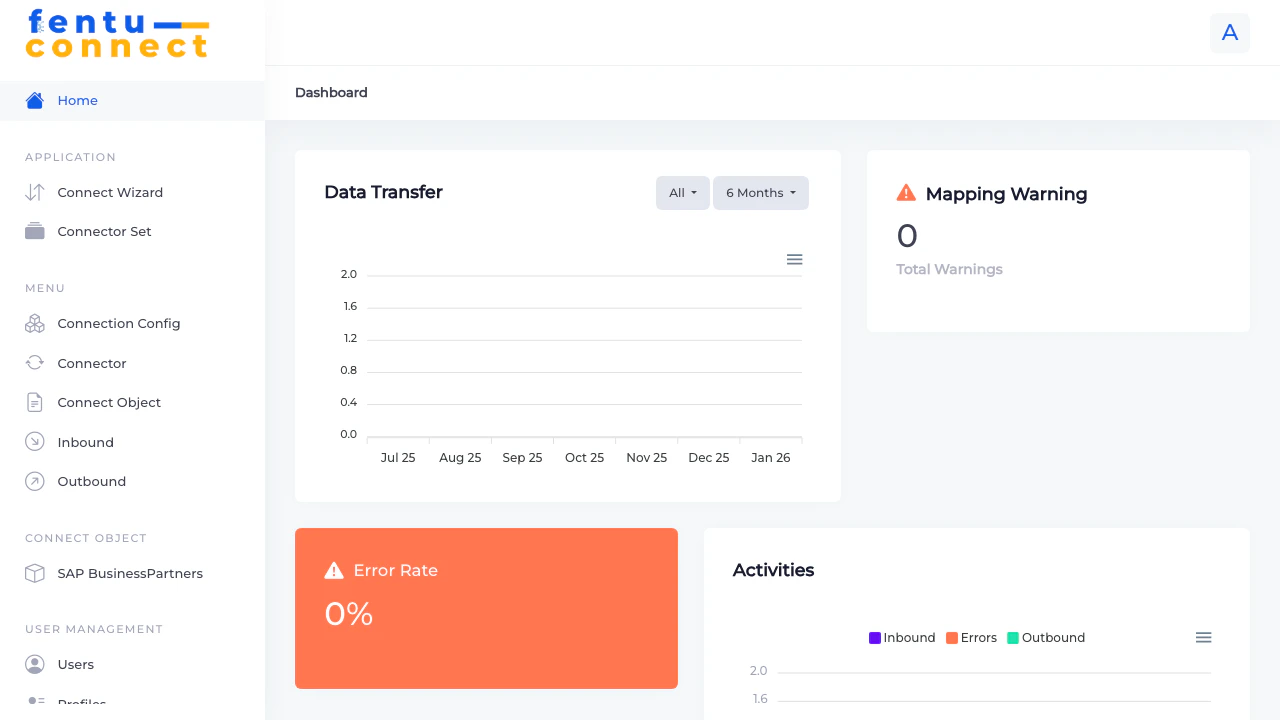 Fentu Connect acts as a bridge between your field service operations and back-office systems, ensuring data consistency across your entire business ecosystem.
## Key Features
Connect Fentu FSM with SAP B1, Salesforce, Acumatica, and other business systems through pre-built connectors.
Configure inbound connections to pull data into Fentu FSM and outbound connections to push data to external systems.
Map fields between systems using direct field mapping, raw data values, or powerful formula expressions.
Use the Connect Wizard to quickly set up new integrations without writing code.
## Supported Integration Types
Fentu Connect supports integration with multiple system types:
| System Type | Description |
| -------------------- | ----------------------------------------------------------------------------- |
| **SAP B1** | SAP Business One ERP integration for customers, products, inventory, and more |
| **Fentu-FSM** | Connect multiple Fentu FSM instances together |
| **Salesforce** | Salesforce CRM integration |
| **Acumatica** | Acumatica Cloud ERP integration |
| **Shopware** | E-commerce platform integration |
| **ABAS-ERP** | ABAS ERP system integration |
| **HRlab** | HR management system integration |
| **Window Maker** | Window manufacturing software integration |
| **Internal Connect** | Internal system-to-system connections |
## How It Works
Set up connection credentials for your external system (API endpoints, authentication, etc.)
Create objects that define the data structures you want to synchronize (customers, products, work orders, etc.)
Map fields between your source system and Fentu FSM, using direct mappings or formula transformations
Configure how data flows between systems - inbound to receive data, outbound to send data
Enable your connections and monitor the data synchronization from the dashboard
## Application Menu Structure
The Fentu Connect application is organized into the following sections:
### Application
* **Connect Wizard** - Quick setup wizard for creating new integrations
* **Connector Set** - Group related connectors together
### Menu
* **Connection Config** - Configure connection credentials and endpoints
* **Connector** - Create and manage individual connectors
* **Connect Object** - Define data objects and their fields
* **Inbound** - Configure inbound data connections
* **Outbound** - Configure outbound data connections
### Connect Objects
* Dynamic menu items for each defined Connect Object (e.g., SAP BusinessPartners, FSM WorkOrder)
### User Management
* **Users** - Manage user accounts
* **Profiles** - Configure user roles and permissions
***
## Getting Started
Use the guided wizard to quickly set up a new integration
Learn how to configure connection credentials
Fentu Connect acts as a bridge between your field service operations and back-office systems, ensuring data consistency across your entire business ecosystem.
## Key Features
Connect Fentu FSM with SAP B1, Salesforce, Acumatica, and other business systems through pre-built connectors.
Configure inbound connections to pull data into Fentu FSM and outbound connections to push data to external systems.
Map fields between systems using direct field mapping, raw data values, or powerful formula expressions.
Use the Connect Wizard to quickly set up new integrations without writing code.
## Supported Integration Types
Fentu Connect supports integration with multiple system types:
| System Type | Description |
| -------------------- | ----------------------------------------------------------------------------- |
| **SAP B1** | SAP Business One ERP integration for customers, products, inventory, and more |
| **Fentu-FSM** | Connect multiple Fentu FSM instances together |
| **Salesforce** | Salesforce CRM integration |
| **Acumatica** | Acumatica Cloud ERP integration |
| **Shopware** | E-commerce platform integration |
| **ABAS-ERP** | ABAS ERP system integration |
| **HRlab** | HR management system integration |
| **Window Maker** | Window manufacturing software integration |
| **Internal Connect** | Internal system-to-system connections |
## How It Works
Set up connection credentials for your external system (API endpoints, authentication, etc.)
Create objects that define the data structures you want to synchronize (customers, products, work orders, etc.)
Map fields between your source system and Fentu FSM, using direct mappings or formula transformations
Configure how data flows between systems - inbound to receive data, outbound to send data
Enable your connections and monitor the data synchronization from the dashboard
## Application Menu Structure
The Fentu Connect application is organized into the following sections:
### Application
* **Connect Wizard** - Quick setup wizard for creating new integrations
* **Connector Set** - Group related connectors together
### Menu
* **Connection Config** - Configure connection credentials and endpoints
* **Connector** - Create and manage individual connectors
* **Connect Object** - Define data objects and their fields
* **Inbound** - Configure inbound data connections
* **Outbound** - Configure outbound data connections
### Connect Objects
* Dynamic menu items for each defined Connect Object (e.g., SAP BusinessPartners, FSM WorkOrder)
### User Management
* **Users** - Manage user accounts
* **Profiles** - Configure user roles and permissions
***
## Getting Started
Use the guided wizard to quickly set up a new integration
Learn how to configure connection credentials