> ## Documentation Index
> Fetch the complete documentation index at: https://docs.fentufsm.com/llms.txt
> Use this file to discover all available pages before exploring further.
# Introduction to Fentu FSM
> fentu FSM is a Field Service Management platform for managing customer requests, quotations, work orders, tasks, service appointments, service objects, technicians, checklists, materials, and ERP-connected service operations.
## Overview
fentu FSM is a Field Service Management platform for managing service requests, quotations, work orders, technicians, and service operations.
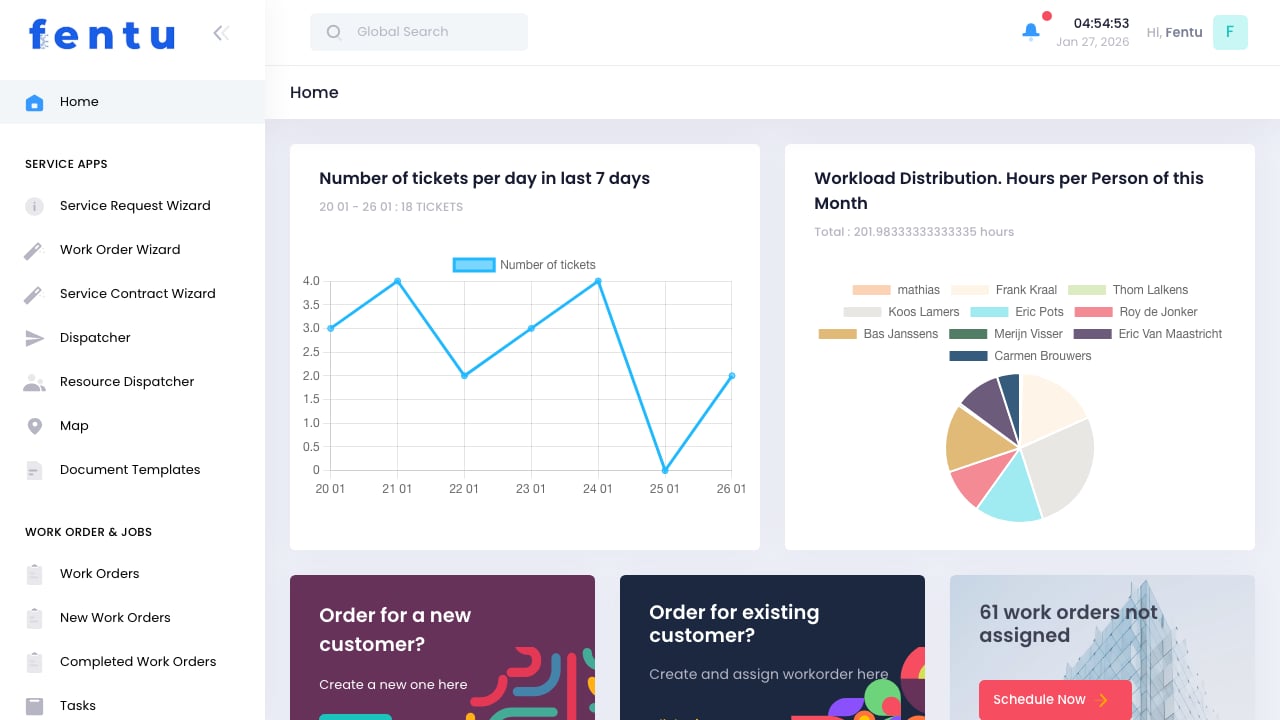 Fentu FSM can be integrated with ERP systems through Fentu Connect and provides dedicated mobile apps for technicians in the field.
## Key Features
Plan, create, assign, and track work orders from initial service need through execution and completion. Manage tasks, service appointments, service objects, technicians, materials, material requests, time entries, documents, and completion status in one structured process.
Schedule technicians, vehicles or tools, based on skills or capabilities on tasks or service appointments. A task can have one or multiple service appointments and multiple service objects. Schedule based on the ressource, map based or project breakdown.
Guide technicians through inspections, maintenance steps, safety checks, measurements, photos, notes, and signatures. Checklists help standardise field execution.
Configure Fentu FSM around your service model, terminology, workflows, mobile views, checklists, documents, material processes, and ERP integration scope.
## Platform Capabilities
Fentu FSM provides the core capabilities required to manage field service operations:
| Area | Description |
| -------------------------------------------------- | ------------------------------------------------------------------------------------------------------------------------------------------------------------------------------------------- |
| **Service Apps** | Guided wizards for service requests, work orders, service contracts, scheduling, maps, and document templates |
| **Work Orders & Tasks** | Work orders, tasks, service appointments, quotations, completed work, and operational tracking |
| **Material Requests** | Request required parts, check ERP availability, support purchase request processes where integrated, track material consumption, and post relevant inventory changes back to the ERP system |
| **Customer, Location & Service Object Management** | Customers, contacts, locations, service objects, and related lower-level parts or devices |
| **Service Management** | Service requests, complaints, service contracts, scheduled maintenance, and time tracking |
| **Products & Inventory** | Products, parts, warehouses, stock-related service information, and inventory integration depending on ERP scope |
| **Resources & Workforce** | Technicians, teams, skills, vehicles, tools, leave management, dispatching, service appointments, and optional route planning |
| **Checklists & Documentation** | Checklist templates, task checklists, inspection steps, readings, photos, signatures, and generated documents |
| **Administration** | User management, profiles, system settings, integrations, imports, exports, and configuration |
## Core Data Structure
Fentu FSM separates customer, contact, location, service object, work order, task, appointment, and material data to support different service structures across industries.
## Core Data Structure
| Business Term | Purpose |
| ----------------------- | ------------------------------------------------------------------------------------------------------------------------------------------- |
| **Request** | Captures an incoming service need, enquiry, issue, defect, complaint, or follow-up item before it becomes a Quotation, or Work Order |
| **Request Tasks** | Defines the scope and required work needed to fulfil a request. Can be one or multiple tasks across service objects, and required materials |
| **Quotation** | Defines the commercial scope before execution |
| **Work Order** | Groups the overall service job or approved scope of work |
| **Work Order Task** | Represents operational work to be executed. A work order can contain one or multiple tasks |
| **Service Appointment** | Scheduled visit or time slot for a work order task. A task can have one or multiple service appointments |
| **Checklist** | Guides technicians through execution steps, inspections, and documentation |
| **Material Request** | Tracks parts, availability checks, procurement processes, consumption, and ERP inventory updates depending on integration scope |
## Typical Execution Structure
A request can result in commercial or operational execution. Each layer defines a different level of detail, from intake to planning and field execution.
```text theme={null}
Request
└── Request Task
└── Time & Material (optional estimation)
Quote
└── Request Task (reference)
└── Time & Material (pricing view)
Work Order
└── Work Order Task
├── Service Object #1
│ ├── Exchange Part / Equipment / Device
│ ├── Checklist
│ └── Time & Material
├── Service Object #2
│ ├── Exchange Part / Equipment / Device
│ ├── Checklist
│ └── Time & Material
└── Service Appointment
```
Fentu FSM can be integrated with ERP systems through Fentu Connect and provides dedicated mobile apps for technicians in the field.
## Key Features
Plan, create, assign, and track work orders from initial service need through execution and completion. Manage tasks, service appointments, service objects, technicians, materials, material requests, time entries, documents, and completion status in one structured process.
Schedule technicians, vehicles or tools, based on skills or capabilities on tasks or service appointments. A task can have one or multiple service appointments and multiple service objects. Schedule based on the ressource, map based or project breakdown.
Guide technicians through inspections, maintenance steps, safety checks, measurements, photos, notes, and signatures. Checklists help standardise field execution.
Configure Fentu FSM around your service model, terminology, workflows, mobile views, checklists, documents, material processes, and ERP integration scope.
## Platform Capabilities
Fentu FSM provides the core capabilities required to manage field service operations:
| Area | Description |
| -------------------------------------------------- | ------------------------------------------------------------------------------------------------------------------------------------------------------------------------------------------- |
| **Service Apps** | Guided wizards for service requests, work orders, service contracts, scheduling, maps, and document templates |
| **Work Orders & Tasks** | Work orders, tasks, service appointments, quotations, completed work, and operational tracking |
| **Material Requests** | Request required parts, check ERP availability, support purchase request processes where integrated, track material consumption, and post relevant inventory changes back to the ERP system |
| **Customer, Location & Service Object Management** | Customers, contacts, locations, service objects, and related lower-level parts or devices |
| **Service Management** | Service requests, complaints, service contracts, scheduled maintenance, and time tracking |
| **Products & Inventory** | Products, parts, warehouses, stock-related service information, and inventory integration depending on ERP scope |
| **Resources & Workforce** | Technicians, teams, skills, vehicles, tools, leave management, dispatching, service appointments, and optional route planning |
| **Checklists & Documentation** | Checklist templates, task checklists, inspection steps, readings, photos, signatures, and generated documents |
| **Administration** | User management, profiles, system settings, integrations, imports, exports, and configuration |
## Core Data Structure
Fentu FSM separates customer, contact, location, service object, work order, task, appointment, and material data to support different service structures across industries.
## Core Data Structure
| Business Term | Purpose |
| ----------------------- | ------------------------------------------------------------------------------------------------------------------------------------------- |
| **Request** | Captures an incoming service need, enquiry, issue, defect, complaint, or follow-up item before it becomes a Quotation, or Work Order |
| **Request Tasks** | Defines the scope and required work needed to fulfil a request. Can be one or multiple tasks across service objects, and required materials |
| **Quotation** | Defines the commercial scope before execution |
| **Work Order** | Groups the overall service job or approved scope of work |
| **Work Order Task** | Represents operational work to be executed. A work order can contain one or multiple tasks |
| **Service Appointment** | Scheduled visit or time slot for a work order task. A task can have one or multiple service appointments |
| **Checklist** | Guides technicians through execution steps, inspections, and documentation |
| **Material Request** | Tracks parts, availability checks, procurement processes, consumption, and ERP inventory updates depending on integration scope |
## Typical Execution Structure
A request can result in commercial or operational execution. Each layer defines a different level of detail, from intake to planning and field execution.
```text theme={null}
Request
└── Request Task
└── Time & Material (optional estimation)
Quote
└── Request Task (reference)
└── Time & Material (pricing view)
Work Order
└── Work Order Task
├── Service Object #1
│ ├── Exchange Part / Equipment / Device
│ ├── Checklist
│ └── Time & Material
├── Service Object #2
│ ├── Exchange Part / Equipment / Device
│ ├── Checklist
│ └── Time & Material
└── Service Appointment
```