> ## Documentation Index
> Fetch the complete documentation index at: https://docs.fentufsm.com/llms.txt
> Use this file to discover all available pages before exploring further.
# Parts
> Manage replacement parts, consumables, and service items
## Overview
Parts represent consumable items, replacement components, and service materials used during maintenance and repair work. Unlike Products (which are installed equipment), Parts are items that technicians consume or replace while servicing assets.
 Parts are consumables (filters, batteries, sensors) while Products are the equipment being serviced (Machine units, fire doors). Parts get used up during service; Products get maintained.
## When to Use Parts
Use the Parts module to:
* Catalog replacement components for serviced equipment
* Track consumable materials (filters, fluids, batteries)
* Define spare parts inventory
* Set up automatic part addition to tasks
* Manage part costs for billing and inventory
* Schedule replacement based on wear cycles
* Link parts to specific equipment checklists
***
## Parts List View
### What You See
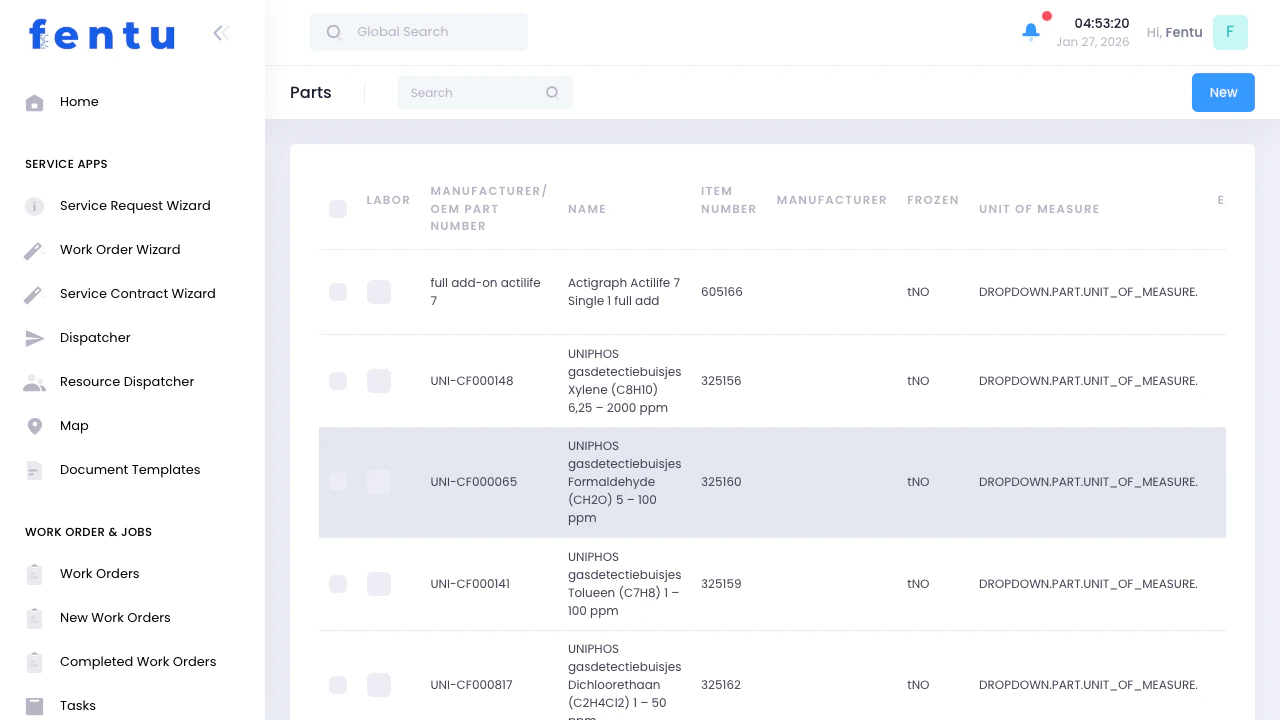
The Parts list displays your parts catalog:
| Column | Shows |
| -------------------------------- | --------------------------------- |
| **Labor** | Labor checkbox indicator |
| **Manufacturer/OEM Part Number** | Manufacturer's part number |
| **Name** | Part name/description |
| **Item Number** | Your internal article/item number |
| **Manufacturer** | Part manufacturer |
| **Frozen** | Inventory frozen status |
| **Unit of Measure** | Measurement unit (dropdown) |
### List Features
* **Search** - Find parts by name, article number, or manufacturer
* **New** - Add new part to catalog
* **Actions** - Edit or delete parts
* **Filter** - Filter by type, manufacturer, or status
* **Sort** - Click columns to sort
***
## Creating a Part
When you click **New**:
### Basic Information
| Field | Description |
| ------------------ | -------------------------------------------------------------------------------- |
| **Name** | Part name (e.g., "Machine Filter 20x25x4", "Fire Door Battery 12V") |
| **Article Number** | Your internal SKU/part number |
| **Code** | Special code for auto-population (`battery`, `smoke_switch`, `ceiling_detector`) |
| **Description** | Detailed part specifications and usage notes |
### Classification
| Field | Options | Description |
| --------------------- | -------- | ------------------------------------------------------------------------------------------------------------------------------------------------------------------------- |
| **Type** | Dropdown | **Sparepart** - Replacement components
Parts are consumables (filters, batteries, sensors) while Products are the equipment being serviced (Machine units, fire doors). Parts get used up during service; Products get maintained.
## When to Use Parts
Use the Parts module to:
* Catalog replacement components for serviced equipment
* Track consumable materials (filters, fluids, batteries)
* Define spare parts inventory
* Set up automatic part addition to tasks
* Manage part costs for billing and inventory
* Schedule replacement based on wear cycles
* Link parts to specific equipment checklists
***
## Parts List View
### What You See
The Parts list displays your parts catalog:
| Column | Shows |
| -------------------------------- | --------------------------------- |
| **Labor** | Labor checkbox indicator |
| **Manufacturer/OEM Part Number** | Manufacturer's part number |
| **Name** | Part name/description |
| **Item Number** | Your internal article/item number |
| **Manufacturer** | Part manufacturer |
| **Frozen** | Inventory frozen status |
| **Unit of Measure** | Measurement unit (dropdown) |
### List Features
* **Search** - Find parts by name, article number, or manufacturer
* **New** - Add new part to catalog
* **Actions** - Edit or delete parts
* **Filter** - Filter by type, manufacturer, or status
* **Sort** - Click columns to sort
***
## Creating a Part
When you click **New**:
### Basic Information
| Field | Description |
| ------------------ | -------------------------------------------------------------------------------- |
| **Name** | Part name (e.g., "Machine Filter 20x25x4", "Fire Door Battery 12V") |
| **Article Number** | Your internal SKU/part number |
| **Code** | Special code for auto-population (`battery`, `smoke_switch`, `ceiling_detector`) |
| **Description** | Detailed part specifications and usage notes |
### Classification
| Field | Options | Description |
| --------------------- | -------- | ------------------------------------------------------------------------------------------------------------------------------------------------------------------------- |
| **Type** | Dropdown | **Sparepart** - Replacement components
**Wearpart** - Parts that wear out
**Consumable** - Used up items (fluids, filters)
**Service** - Service materials |
| **Replacement Cycle** | Dropdown | Monthly, Quarterly, Semi-Annual, Yearly, Every 2/4/8 Years |
### Supplier & Pricing
| Field | Description |
| ---------------- | ------------------------- |
| **Manufacturer** | Part manufacturer name |
| **Cost** | Your cost per unit |
| **PE per Unit** | Price per unit (purchase) |
| **ME per Unit** | Material expense per unit |
| **PE von VE** | Price from sales unit |
| **Cost von VE** | Cost from sales unit |
### Inventory Flags
| Field | Description |
| ------------------ | ------------------------------- |
| **Purchase Item** | Can be purchased from suppliers |
| **Sales Item** | Can be sold to customers |
| **Inventory Item** | Tracked in warehouse inventory |
### Automation Settings
| Field | Description |
| -------------------------------------- | ---------------------------------------------------------- |
| **Auto Add for New Task on Wizard** | Automatically add this part when creating tasks via wizard |
| **Auto Approved for Material Request** | Skip approval for material requests of this part |
| **Auto Add for Task Type** | Automatically add for specific task types |
| **Allowed Task Type to Auto Add** | Specify which task types trigger auto-addition |
### Usage Notes
| Field | Description |
| ------------------------- | -------------------------------------------------------------------------- |
| **Report** | Master template for replacement reports (when part replacement is overdue) |
| **Remark Next Use** | Instructions for next use |
| **Remark Under Next Use** | Additional usage remarks |
***
## Part Detail View
When you click on a part:
### Information Tab
All part specifications, pricing, and settings.
### Related Items Tabs
Maintenance checklists that include this part. Links parts to inspection procedures.
**Example:** "Machine Filter" part linked to "Machine Quarterly Maintenance" checklist.
All tasks where this part has been used. Track consumption history and patterns.
**Insights:** Identify frequently used parts, consumption rates, common failure items.
Assets that have this part installed as a trackable component. Used when parts have serial numbers or require individual tracking.
**Use Case:** Battery packs with replacement dates, safety-critical components with certifications.
Inventory levels per warehouse if marked as Inventory Item.
**Management:** View stock, adjust quantities, transfer between warehouses.
Complete audit trail of part record changes.
***
## Common Part Scenarios
### Scenario 1: Adding Consumable Parts
**Goal:** Set up air filters that technicians use regularly
**Steps:**
1. Click **New Part**
2. Enter details:
* Name: "Machine Air Filter 20x25x4 MERV-13"
* Article Number: "FILT-20254-M13"
* Type: "Consumable"
* Cost: \$12.50
* Manufacturer: "FilterPro Inc"
3. Check **Inventory Item** (you stock these)
4. Check **Auto Add for New Task on Wizard** if used in most Machine tasks
5. Set **Replacement Cycle**: "Quarterly"
6. Save
**Result:** Part available for task assignment, inventory tracked, auto-added to relevant tasks.
***
### Scenario 2: Parts with Replacement Cycles
**Goal:** Track battery replacements with automatic scheduling
**Steps:**
1. Create part: "Fire Door Battery 12V 7Ah"
2. Set **Code**: "battery" (enables auto-population to asset parts)
3. Set **Replacement Cycle**: "Every 2 Years"
4. Set **Cost**: \$45.00
5. Link to checklist: "Fire Door Annual Inspection"
6. Enable **Report** with template: "Battery replacement recommended - inspect voltage and load test results"
**Result:** When batteries reach replacement cycle, system generates alerts and reports using your template.
***
### Scenario 3: Auto-Adding Parts to Tasks
**Goal:** Automatically include lubricant in all door maintenance tasks
**Setup:**
1. Create part: "Door Hinge Lubricant 400ml"
2. Check **Auto Add for Task Type**
3. Set **Allowed Task Type**: "preventive\_maintenance,scheduled\_maintenance"
4. Check **Auto Approved for Material Request**
**Result:** Whenever technician creates preventive or scheduled maintenance task, lubricant auto-adds to parts list and material request auto-approves.
***
### Scenario 4: Tracking Spare Parts
**Goal:** Manage critical spare components kept in stock
**Setup:**
1. Create part: "Smoke Detector Replacement Head"
2. Type: "Sparepart"
3. Check **Inventory Item**, **Purchase Item**, **Sales Item**
4. Set min/max stock levels (in warehouse settings)
5. Link to assets where used
**Management:** Track which assets use this part, monitor stock levels, reorder when low.
***
## Part Actions
Update details, pricing, or settings. Changes apply to future usage; doesn't affect historical records.
Remove from catalog. Only possible if not linked to tasks, assets, or inventory transactions.
See consumption history across tasks and work orders. Identify high-usage parts.
Quick view of inventory levels across warehouses (if Inventory Item enabled).
***
## Tips and Best Practices
Create a logical part numbering system:
* Category prefix: FILT- (filters), BAT- (batteries), SEN- (sensors)
* Specification: 20254 (size), 12V (voltage)
* Variant: M13 (MERV rating), LA (lead acid)
**Example:** FILT-20254-M13 = Filter, 20x25x4, MERV-13
**Why:** Easy identification, prevents duplicate entries, scales as catalog grows.
Base replacement cycles on:
* Manufacturer recommendations
* Regulatory requirements (smoke detectors, batteries)
* Historical failure data
* Environmental conditions
**Impact:** Proactive replacements prevent failures, system schedules reminders automatically.
Enable auto-add for parts that are:
* Used in every service of a type (lubricants, cleaning supplies)
* Required by procedure (safety items, compliance materials)
* Frequently forgotten but needed
**Don't Auto-Add:** Repair parts needed only sometimes, expensive items, customer-specific materials.
Connect parts to relevant checklists:
* Ensures technicians know which parts are needed
* Checklist reminds them to check/replace part
* Standardizes part usage across team
**Example:** "Battery" part linked to "Annual Battery Test" checklist item.
Enable **Inventory Item** for:
* Long lead-time parts
* Critical safety components
* High-cost items requiring approval
* Commonly used consumables
**Benefit:** Prevent stockouts, track usage trends, calculate inventory costs.
Use Description field for:
* Technical specifications
* Compatibility notes ("Use only with Model X")
* Installation instructions
* Safety warnings
* Acceptable substitutes
**Helps:** Technicians select correct parts, reduce errors, speed up ordering.
Keep cost data current:
* Update when supplier prices change
* Include average shipping if applicable
* Account for bulk discounts
* Track cost trends over time
**Usage:** Accurate job costing, correct billing, inventory valuation.
Set Code field for parts that auto-populate to asset parts:
* `battery` - Auto-adds to battery fields
* `smoke_switch` - Auto-adds to smoke detector fields
* `ceiling_detector` - Auto-adds to ceiling detector fields
**Result:** When creating assets with these components, part auto-links.
***
## Common Questions
**Products:**
* Equipment you service (fire doors, Machine units)
* Installed at customer sites as assets
* Have maintenance schedules
* Example: "Commercial Machine Unit RTU-500"
**Parts:**
* Items consumed during service
* Replaced components or materials
* Tracked by consumption, not installation
* Example: "Machine Filter 20x25", "Door Hinge Lubricant"
**Relationship:** Parts are used to maintain Products.
**Enable Inventory Item for:**
* Parts you stock in warehouses
* Expensive items requiring approval
* Critical parts with long lead times
* Items you want to track consumption of
**Don't Enable for:**
* Low-value consumables bought as-needed
* Customer-supplied parts
* Service labor (use Type: Service instead)
* One-time special order items
**Why:** Inventory tracking adds overhead - use only when value justifies it.
**Replacement Cycle defines:**
* How often part should be replaced
* System calculates next replacement date
* Generates alerts when replacement overdue
* Appears in proactive maintenance reports
**Used For:**
* Batteries (every 2 years)
* Smoke detectors (every 8 years per code)
* Filters (quarterly)
* Wear parts (based on hours/cycles)
**Triggers:** Preventive maintenance tasks and replacement reminders.
**Automatically includes part when:**
* Technician creates task via wizard
* Task type matches allowed types
* Saves technician time on common tasks
**Example Setup:**
* Part: "Door Hinge Lubricant"
* Auto Add: Enabled
* Allowed Types: "preventive\_maintenance"
* Result: Every preventive task auto-includes lubricant
**Caution:** Only use for parts needed in most/all tasks of that type.
Part records store base cost/pricing:
* Cost: Your purchase cost
* PE/ME fields: Standard pricing
**For customer-specific pricing:**
* Use service contract pricing rules
* Configure markup percentages per customer
* Override prices on individual work orders
**Part record = base price; Contracts/Work Orders = actual billed price.**
**Report field is a template for:**
* Automatic replacement reports
* Triggered when part passes replacement cycle
* Populated to asset part replacement notifications
**Example:**
* Part: "Battery 12V"
* Report template: "Battery voltage test shows \[X]V under load. Recommend replacement per 2-year cycle. Last install date: \[DATE]."
**System fills placeholders with actual data when generating reports.**
**Two ways to link:**
**1. Part to Checklist:**
* Open part record
* Go to Checklists tab
* Add relevant checklists
* Part appears when checklist is used
**2. Checklist to Part:**
* Configure checklist item
* Link to specific part
* Part auto-suggests during task
**Usage:** Ensures correct parts available when checklist is executed.
Deletion only possible if part is not:
* Used in any tasks (historical or active)
* Linked to assets as tracked component
* Referenced in work orders
* Has inventory transactions
**If in use:** System prevents deletion and shows references.
**Alternative:** Mark as discontinued in description, stop auto-add, remove from inventory.
***
## Related Documentation
Equipment that uses these parts. Parts are consumed servicing products.
Add parts to tasks for material tracking and billing.
Track individual part installations on specific assets with serial numbers.
Manage part inventory across warehouse locations.