> ## Documentation Index
> Fetch the complete documentation index at: https://docs.fentufsm.com/llms.txt
> Use this file to discover all available pages before exploring further.
# Product Types
> Classify and organize products into categories
## Overview
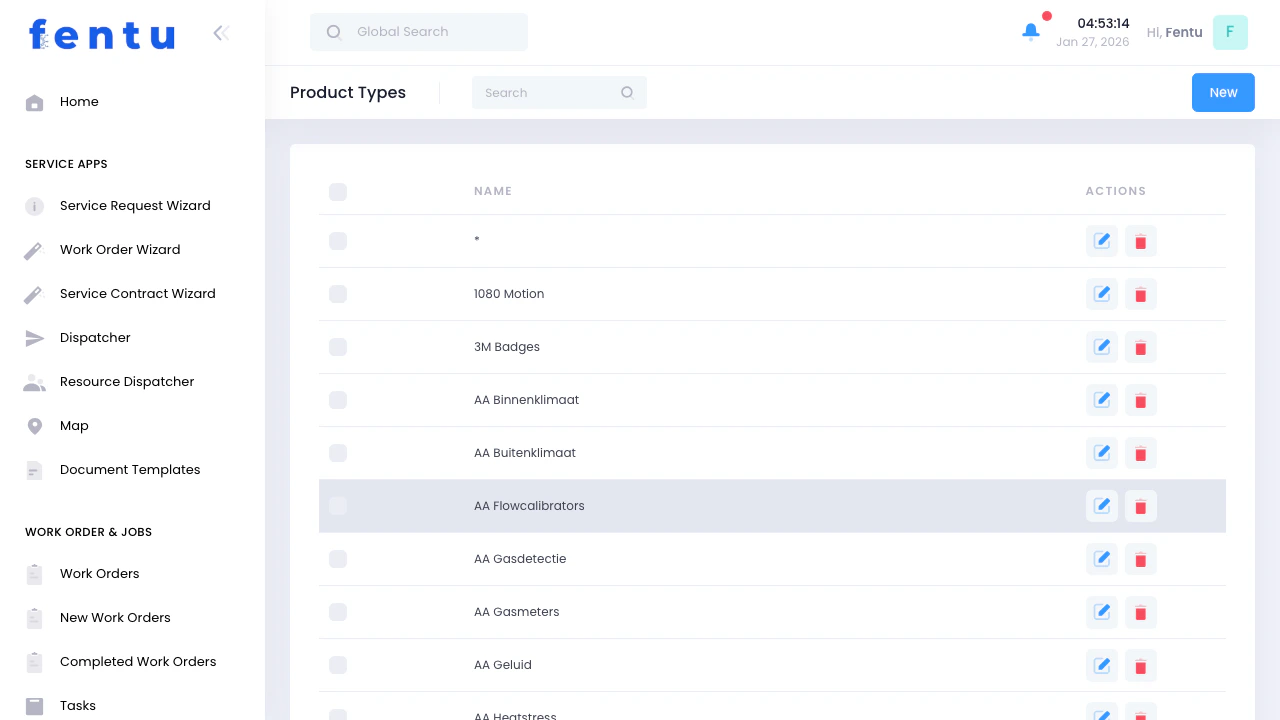
Product Types provide a flexible classification system for organizing your service catalog. Products can be assigned to multiple types, enabling filtering, reporting, and workflow automation based on equipment categories.
 Product Types are tags for categorization, not hierarchical categories. One product can have multiple types assigned (e.g., "Fire Safety" + "Door Systems" + "Life Safety Critical").
## When to Use Product Types
Create product types to:
* Group similar equipment for reporting
* Filter products during work order creation
* Assign type-specific checklists automatically
* Route work to specialized teams
* Generate compliance reports by equipment class
* Organize large product catalogs
***
## Product Types List View
### What You See
The list displays all defined product types:
| Column | Shows |
| -------- | ------------------------------------------------------------ |
| **Name** | Type name (e.g., "Machine Systems", "Fire Safety Equipment") |
### List Features
* **Search** - Find types by name
* **New** - Create new product type
* **Edit** - Modify existing types
* **Delete** - Remove unused types
* **Sort** - Click Name header to sort alphabetically
***
## Creating a Product Type
When you click **New**:
| Field | Description |
| --------------- | ------------------------------------------------------------------------------ |
| **Name** | Type name (e.g., "Fire Safety Equipment", "Machine Systems", "Access Control") |
| **Description** | Optional detailed description of what products fit this type |
| **Acronym** | Optional short code for this type |
Use clear, descriptive names that make sense to all users. Avoid abbreviations unless they're universally understood in your organization.
***
## Using Product Types
### Assigning Types to Products
When creating or editing a product:
1. Use the **Type** lookup field
2. Select one or more product types
3. Product inherits properties from assigned types
### Type-Based Filtering
Product types enable filtering in:
* Product list views
* Work order product selection
* Asset searches
* Inventory reports
* Scheduled maintenance planning
### Automatic Checklist Assignment
Link checklists to product types:
* All products of that type inherit the checklist
* Simplifies maintenance standardization
* Ensures compliance across equipment categories
***
## Common Product Type Examples
### By Equipment Category
* Machine Systems
* Fire Safety Equipment
* Security Systems
* Door Systems
* Electrical Equipment
* Plumbing Systems
### By Service Complexity
* Basic Maintenance
* Advanced Technical
* Specialist Equipment
* Certified-Only Equipment
### By Regulatory Class
* Life Safety Critical
* Building Code Compliance
* Optional Equipment
* Comfort Systems
### By Contract Type
* Preventive Maintenance
* Repair-Only
* Full Service Contract
* Inspection-Only
***
## Product Type Scenarios
### Scenario 1: Organizing Fire Safety Equipment
**Goal:** Group all fire-related products for compliance reporting
**Steps:**
1. Create product type: "Fire Safety Equipment"
2. Assign to products:
* Fire doors
* Fire alarms
* Emergency lighting
* Fire extinguishers
* Smoke detectors
3. Link checklist: "Fire Safety Annual Inspection"
**Result:** All fire safety products follow same inspection procedures and can be reported together for compliance.
***
### Scenario 2: Routing to Specialized Teams
**Goal:** Ensure certified technicians handle specific equipment
**Setup:**
1. Create type: "Machine - Refrigerant Systems"
2. Assign to all refrigeration equipment
3. Link required skill: "EPA 608 Certification"
**Benefit:** System suggests only certified technicians when scheduling work on these products.
***
### Scenario 3: Multi-Type Classification
**Goal:** Classify equipment by multiple dimensions
**Example Product:** Emergency Exit Fire Door
**Assigned Types:**
* Fire Safety Equipment (regulatory category)
* Door Systems (equipment category)
* Life Safety Critical (priority level)
* Monthly Inspection Required (service frequency)
**Usage:** Filter by any dimension for targeted reporting or scheduling.
***
## Product Type Actions
Modify name or description. Changes reflect immediately across all assigned products.
Remove type from system. Only possible if no products are assigned to it.
See all products assigned to this type. Quick access for bulk updates.
Assign checklists at type level to inherit across all products of this type.
***
## Tips and Best Practices
Design types that serve actual business needs:
* **Good:** "Life Safety Critical" (drives priority), "Machine Systems" (drives routing)
* **Avoid:** "Group A", "Type 1" (meaningless labels)
**Why:** Types should answer "how do I want to filter or report on products?"
Create types across different dimensions:
* Equipment category (Machine, Fire, Electrical)
* Service level (Basic, Advanced, Specialist)
* Compliance class (Life Safety, Building Code, Standard)
* Contract type (PM, Repair-Only, Full Service)
**Benefit:** Flexible filtering without complex hierarchies.
Use consistent patterns:
* Title case: "Machine Systems" not "Machine systems"
* Descriptive: "Fire Safety Equipment" not "Fire Stuff"
* Specific: "Commercial Refrigeration" not "Cooling"
**Impact:** Professional appearance and easier searching.
For procedures common to all products of a type:
* Attach checklist to product type
* All products inherit the checklist
* Update once, applies to all
**Example:** "Annual Fire Safety Inspection" checklist on "Fire Safety Equipment" type.
Avoid type proliferation:
* Quarterly review: are all types still useful?
* Merge overlapping types
* Delete unused types
* Standardize names across team
**Prevents:** Confusion from too many similar types.
For each type, clarify:
* What products should have this type?
* Why does this type exist?
* Who uses it for filtering/reporting?
**Helps:** Team members apply types consistently.
***
## Common Questions
**As many as useful**, but typically 2-4 types per product:
**Recommended:**
* One equipment category type (Machine, Fire, Security)
* One service/complexity type (Basic, Advanced, Specialist)
* One or more special classification types (Life Safety, Compliance)
**Avoid:** Over-tagging with redundant types that don't serve filtering/reporting needs.
Yes, edit the type name anytime:
* Changes apply immediately to all products
* Historical data retains the type linkage
* Reports update with new name
**Safe to rename:** No data loss occurs.
Deletion only possible if:
* No products are assigned to this type
* No checklists link to it
* No workflows reference it
**If in use:** System prevents deletion and shows where it's used.
**Alternative:** Rename to "OBSOLETE - \[Old Name]" instead of deleting.
**Generally no.** Use the Manufacturer field on products instead.
**Create brand/manufacturer types only if:**
* Different service procedures per brand
* Brand-specific technician certification
* Contract routing by manufacturer
**Example:** If all "Brand X Machine" units need specialist certification, create "Brand X Equipment" type.
**Fentu Product Types:**
* Flat structure (no hierarchy)
* Multiple types per product (tags, not exclusive categories)
* Flexible filtering on any combination
**Traditional Categories:**
* Hierarchical (parent/child relationships)
* One category per product
* Structured browsing
**Fentu Advantage:** More flexible for service industry where equipment often fits multiple classifications.
Yes, link checklists to product types:
**How:**
1. Open product type
2. Go to Checklists tab
3. Add relevant checklists
**Result:** All products of this type inherit these checklists automatically.
**Use Case:** Standardize fire safety inspections across all "Fire Safety Equipment" products.
Indirectly yes:
**Affects Scheduling When:**
* Types have required skills linked
* System suggests technicians with matching skills
* Helps route specialized equipment to certified staff
**Affects Filtering When:**
* Creating work orders (filter products by type)
* Planning preventive maintenance (select types for campaigns)
* Generating reports (group by type)
**Direct Impact:** Through checklist and skill linkage, not the type itself.
***
## Related Documentation
Assign product types when creating or editing products.
Link checklists to product types for automatic assignment across products.
Assets inherit product types from their parent product.
Combine types with required skills for intelligent technician routing.
Product Types are tags for categorization, not hierarchical categories. One product can have multiple types assigned (e.g., "Fire Safety" + "Door Systems" + "Life Safety Critical").
## When to Use Product Types
Create product types to:
* Group similar equipment for reporting
* Filter products during work order creation
* Assign type-specific checklists automatically
* Route work to specialized teams
* Generate compliance reports by equipment class
* Organize large product catalogs
***
## Product Types List View
### What You See
The list displays all defined product types:
| Column | Shows |
| -------- | ------------------------------------------------------------ |
| **Name** | Type name (e.g., "Machine Systems", "Fire Safety Equipment") |
### List Features
* **Search** - Find types by name
* **New** - Create new product type
* **Edit** - Modify existing types
* **Delete** - Remove unused types
* **Sort** - Click Name header to sort alphabetically
***
## Creating a Product Type
When you click **New**:
| Field | Description |
| --------------- | ------------------------------------------------------------------------------ |
| **Name** | Type name (e.g., "Fire Safety Equipment", "Machine Systems", "Access Control") |
| **Description** | Optional detailed description of what products fit this type |
| **Acronym** | Optional short code for this type |
Use clear, descriptive names that make sense to all users. Avoid abbreviations unless they're universally understood in your organization.
***
## Using Product Types
### Assigning Types to Products
When creating or editing a product:
1. Use the **Type** lookup field
2. Select one or more product types
3. Product inherits properties from assigned types
### Type-Based Filtering
Product types enable filtering in:
* Product list views
* Work order product selection
* Asset searches
* Inventory reports
* Scheduled maintenance planning
### Automatic Checklist Assignment
Link checklists to product types:
* All products of that type inherit the checklist
* Simplifies maintenance standardization
* Ensures compliance across equipment categories
***
## Common Product Type Examples
### By Equipment Category
* Machine Systems
* Fire Safety Equipment
* Security Systems
* Door Systems
* Electrical Equipment
* Plumbing Systems
### By Service Complexity
* Basic Maintenance
* Advanced Technical
* Specialist Equipment
* Certified-Only Equipment
### By Regulatory Class
* Life Safety Critical
* Building Code Compliance
* Optional Equipment
* Comfort Systems
### By Contract Type
* Preventive Maintenance
* Repair-Only
* Full Service Contract
* Inspection-Only
***
## Product Type Scenarios
### Scenario 1: Organizing Fire Safety Equipment
**Goal:** Group all fire-related products for compliance reporting
**Steps:**
1. Create product type: "Fire Safety Equipment"
2. Assign to products:
* Fire doors
* Fire alarms
* Emergency lighting
* Fire extinguishers
* Smoke detectors
3. Link checklist: "Fire Safety Annual Inspection"
**Result:** All fire safety products follow same inspection procedures and can be reported together for compliance.
***
### Scenario 2: Routing to Specialized Teams
**Goal:** Ensure certified technicians handle specific equipment
**Setup:**
1. Create type: "Machine - Refrigerant Systems"
2. Assign to all refrigeration equipment
3. Link required skill: "EPA 608 Certification"
**Benefit:** System suggests only certified technicians when scheduling work on these products.
***
### Scenario 3: Multi-Type Classification
**Goal:** Classify equipment by multiple dimensions
**Example Product:** Emergency Exit Fire Door
**Assigned Types:**
* Fire Safety Equipment (regulatory category)
* Door Systems (equipment category)
* Life Safety Critical (priority level)
* Monthly Inspection Required (service frequency)
**Usage:** Filter by any dimension for targeted reporting or scheduling.
***
## Product Type Actions
Modify name or description. Changes reflect immediately across all assigned products.
Remove type from system. Only possible if no products are assigned to it.
See all products assigned to this type. Quick access for bulk updates.
Assign checklists at type level to inherit across all products of this type.
***
## Tips and Best Practices
Design types that serve actual business needs:
* **Good:** "Life Safety Critical" (drives priority), "Machine Systems" (drives routing)
* **Avoid:** "Group A", "Type 1" (meaningless labels)
**Why:** Types should answer "how do I want to filter or report on products?"
Create types across different dimensions:
* Equipment category (Machine, Fire, Electrical)
* Service level (Basic, Advanced, Specialist)
* Compliance class (Life Safety, Building Code, Standard)
* Contract type (PM, Repair-Only, Full Service)
**Benefit:** Flexible filtering without complex hierarchies.
Use consistent patterns:
* Title case: "Machine Systems" not "Machine systems"
* Descriptive: "Fire Safety Equipment" not "Fire Stuff"
* Specific: "Commercial Refrigeration" not "Cooling"
**Impact:** Professional appearance and easier searching.
For procedures common to all products of a type:
* Attach checklist to product type
* All products inherit the checklist
* Update once, applies to all
**Example:** "Annual Fire Safety Inspection" checklist on "Fire Safety Equipment" type.
Avoid type proliferation:
* Quarterly review: are all types still useful?
* Merge overlapping types
* Delete unused types
* Standardize names across team
**Prevents:** Confusion from too many similar types.
For each type, clarify:
* What products should have this type?
* Why does this type exist?
* Who uses it for filtering/reporting?
**Helps:** Team members apply types consistently.
***
## Common Questions
**As many as useful**, but typically 2-4 types per product:
**Recommended:**
* One equipment category type (Machine, Fire, Security)
* One service/complexity type (Basic, Advanced, Specialist)
* One or more special classification types (Life Safety, Compliance)
**Avoid:** Over-tagging with redundant types that don't serve filtering/reporting needs.
Yes, edit the type name anytime:
* Changes apply immediately to all products
* Historical data retains the type linkage
* Reports update with new name
**Safe to rename:** No data loss occurs.
Deletion only possible if:
* No products are assigned to this type
* No checklists link to it
* No workflows reference it
**If in use:** System prevents deletion and shows where it's used.
**Alternative:** Rename to "OBSOLETE - \[Old Name]" instead of deleting.
**Generally no.** Use the Manufacturer field on products instead.
**Create brand/manufacturer types only if:**
* Different service procedures per brand
* Brand-specific technician certification
* Contract routing by manufacturer
**Example:** If all "Brand X Machine" units need specialist certification, create "Brand X Equipment" type.
**Fentu Product Types:**
* Flat structure (no hierarchy)
* Multiple types per product (tags, not exclusive categories)
* Flexible filtering on any combination
**Traditional Categories:**
* Hierarchical (parent/child relationships)
* One category per product
* Structured browsing
**Fentu Advantage:** More flexible for service industry where equipment often fits multiple classifications.
Yes, link checklists to product types:
**How:**
1. Open product type
2. Go to Checklists tab
3. Add relevant checklists
**Result:** All products of this type inherit these checklists automatically.
**Use Case:** Standardize fire safety inspections across all "Fire Safety Equipment" products.
Indirectly yes:
**Affects Scheduling When:**
* Types have required skills linked
* System suggests technicians with matching skills
* Helps route specialized equipment to certified staff
**Affects Filtering When:**
* Creating work orders (filter products by type)
* Planning preventive maintenance (select types for campaigns)
* Generating reports (group by type)
**Direct Impact:** Through checklist and skill linkage, not the type itself.
***
## Related Documentation
Assign product types when creating or editing products.
Link checklists to product types for automatic assignment across products.
Assets inherit product types from their parent product.
Combine types with required skills for intelligent technician routing.