> ## Documentation Index
> Fetch the complete documentation index at: https://docs.fentufsm.com/llms.txt
> Use this file to discover all available pages before exploring further.
# Vehicles
> Managing service vehicles and fleet operations
 ## Overview
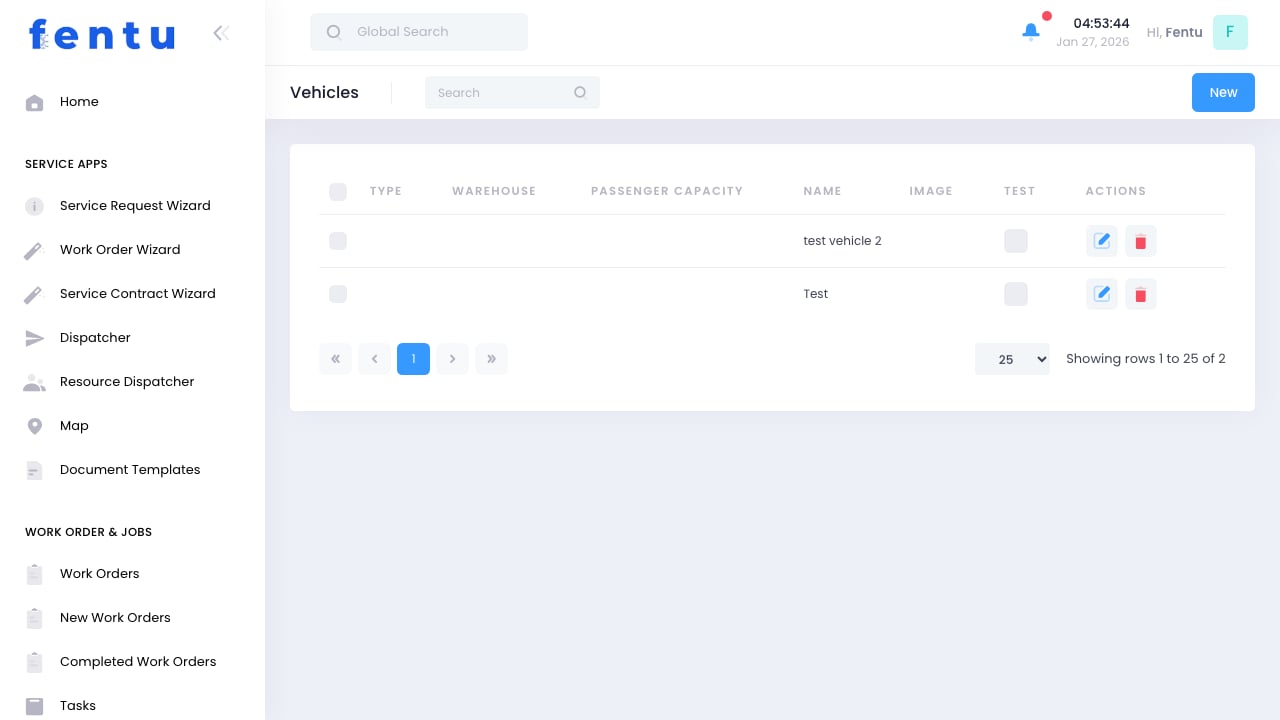
The Vehicles module manages your fleet of service vehicles. Each vehicle can be assigned to technicians, tracked for maintenance, and configured as a mobile warehouse for parts inventory.
Service vehicles are critical assets. Proper tracking ensures technicians have reliable transportation and mobile parts inventory to complete jobs efficiently.
## When to Use Vehicles
Manage vehicles for:
* **Fleet Tracking** - Maintaining records of all service vehicles
* **Technician Assignment** - Assigning vehicles to technicians
* **Mobile Inventory** - Tracking parts stored in vehicles
* **Maintenance Scheduling** - Planning vehicle service and inspections
* **Cost Tracking** - Monitoring vehicle-related expenses
Each vehicle that carries parts inventory should be set up as both a vehicle record and a warehouse. This enables complete tracking of mobile inventory.
***
## Vehicle Information
Each vehicle record includes:
| Field | Description |
| ----------------------- | -------------------------------------- |
| **Vehicle Name** | Descriptive name for the vehicle |
| **License Plate** | Registration/license plate number |
| **VIN** | Vehicle identification number |
| **Make/Model** | Vehicle manufacturer and model |
| **Year** | Model year |
| **Type** | Vehicle type (Van, Truck, Car, etc.) |
| **Assigned Technician** | Technician currently using the vehicle |
| **Branch** | Service branch the vehicle belongs to |
| **Status** | Active, Inactive, In Maintenance |
### Vehicle Types
| Type | Description | Typical Use |
| ------------- | ------------------------- | --------------------------------- |
| **Van** | Cargo van | Standard service calls with parts |
| **Truck** | Service truck | Heavy equipment, installations |
| **Car** | Passenger vehicle | Inspections, estimates |
| **Specialty** | Bucket truck, crane, etc. | Specialized equipment work |
***
## Creating Vehicle Records
Go to Products & Inventory > Vehicles
Start a new vehicle record
Provide make, model, year, and identification
Link vehicle to service branch
Assign to technician if applicable
Set up warehouse for mobile inventory (optional)
Save the vehicle record
### Setting Up Mobile Inventory
To track parts in vehicles:
1. Create the vehicle record
2. Create a warehouse with type "Vehicle"
3. Link warehouse to vehicle
4. Configure par levels for common parts
5. Stock initial inventory
When a technician uses parts from their vehicle, inventory automatically deducts from the vehicle warehouse if properly configured.
***
## Vehicle Assignment
### Assigning Vehicles to Technicians
| Assignment Type | Description |
| --------------- | ---------------------------------------------------------- |
| **Permanent** | Vehicle assigned to one technician full-time |
| **Shared** | Multiple technicians share the vehicle |
| **Pool** | Vehicle available for anyone to use as needed |
| **Temporary** | Short-term assignment while regular vehicle is unavailable |
### Managing Assignments
Choose vehicle to assign
Choose technician from list
Specify start and end dates (if temporary)
Move any mobile inventory if needed
Save the assignment
When reassigning vehicles, ensure mobile inventory is properly transferred or reconciled. Parts should move with the vehicle unless otherwise specified.
***
## Vehicle Maintenance
### Tracking Maintenance
Keep vehicles in service with:
* **Scheduled Maintenance** - Oil changes, inspections, tire rotations
* **Repair Records** - Documentation of repairs performed
* **Mileage Tracking** - Odometer readings for maintenance triggers
* **Inspection Records** - Safety and regulatory inspections
### Maintenance Statuses
| Status | Description | Actions |
| ------------------ | -------------------------- | ------------------------ |
| **Active** | Vehicle in regular service | Available for assignment |
| **In Maintenance** | Currently being serviced | Not available for use |
| **Out of Service** | Not usable due to issues | Needs repair |
| **Retired** | No longer in fleet | Archive only |
***
## Fleet Management
### Fleet Reporting
Monitor fleet performance:
* **Utilization** - How often vehicles are in use
* **Maintenance Costs** - Spending on repairs and service
* **Fuel Costs** - Fuel consumption tracking
* **Mileage** - Distance traveled by vehicle/technician
* **Age Analysis** - Fleet age and replacement planning
### Best Practices
Require technicians to perform daily pre-trip inspections. Document any issues immediately.
Follow manufacturer maintenance schedules. Preventive maintenance prevents costly breakdowns.
Maintain clean, professional vehicles. They represent your company to customers.
Record all maintenance, repairs, and costs. This data helps with replacement decisions.
Never skip safety-related maintenance. Vehicle safety affects employees and the public.
Budget for vehicle replacements based on age, mileage, and condition data.
***
## Common Questions
Yes, for shared or pool vehicles. The current user can be updated as assignments change. Track who had the vehicle when for accountability.
Change status to "Out of Service" and document the issue. Reassign the technician to another vehicle or temporarily suspend their schedule.
Fentu can integrate with GPS/telematics systems. Vehicle location data can be imported for dispatch optimization and customer notifications.
Transfer all inventory to another location before retiring the vehicle. The system prevents retirement with inventory remaining.
Manage leased vehicles the same as owned vehicles. You can add custom fields for lease information like lease end date and payment details.
Permissions control what technicians can update. Typically they can record mileage and report issues, but not change assignments.
***
## Related Documentation
Storage locations including vehicles
Technician management
Tool tracking and assignment
Mobile inventory management
## Overview
The Vehicles module manages your fleet of service vehicles. Each vehicle can be assigned to technicians, tracked for maintenance, and configured as a mobile warehouse for parts inventory.
Service vehicles are critical assets. Proper tracking ensures technicians have reliable transportation and mobile parts inventory to complete jobs efficiently.
## When to Use Vehicles
Manage vehicles for:
* **Fleet Tracking** - Maintaining records of all service vehicles
* **Technician Assignment** - Assigning vehicles to technicians
* **Mobile Inventory** - Tracking parts stored in vehicles
* **Maintenance Scheduling** - Planning vehicle service and inspections
* **Cost Tracking** - Monitoring vehicle-related expenses
Each vehicle that carries parts inventory should be set up as both a vehicle record and a warehouse. This enables complete tracking of mobile inventory.
***
## Vehicle Information
Each vehicle record includes:
| Field | Description |
| ----------------------- | -------------------------------------- |
| **Vehicle Name** | Descriptive name for the vehicle |
| **License Plate** | Registration/license plate number |
| **VIN** | Vehicle identification number |
| **Make/Model** | Vehicle manufacturer and model |
| **Year** | Model year |
| **Type** | Vehicle type (Van, Truck, Car, etc.) |
| **Assigned Technician** | Technician currently using the vehicle |
| **Branch** | Service branch the vehicle belongs to |
| **Status** | Active, Inactive, In Maintenance |
### Vehicle Types
| Type | Description | Typical Use |
| ------------- | ------------------------- | --------------------------------- |
| **Van** | Cargo van | Standard service calls with parts |
| **Truck** | Service truck | Heavy equipment, installations |
| **Car** | Passenger vehicle | Inspections, estimates |
| **Specialty** | Bucket truck, crane, etc. | Specialized equipment work |
***
## Creating Vehicle Records
Go to Products & Inventory > Vehicles
Start a new vehicle record
Provide make, model, year, and identification
Link vehicle to service branch
Assign to technician if applicable
Set up warehouse for mobile inventory (optional)
Save the vehicle record
### Setting Up Mobile Inventory
To track parts in vehicles:
1. Create the vehicle record
2. Create a warehouse with type "Vehicle"
3. Link warehouse to vehicle
4. Configure par levels for common parts
5. Stock initial inventory
When a technician uses parts from their vehicle, inventory automatically deducts from the vehicle warehouse if properly configured.
***
## Vehicle Assignment
### Assigning Vehicles to Technicians
| Assignment Type | Description |
| --------------- | ---------------------------------------------------------- |
| **Permanent** | Vehicle assigned to one technician full-time |
| **Shared** | Multiple technicians share the vehicle |
| **Pool** | Vehicle available for anyone to use as needed |
| **Temporary** | Short-term assignment while regular vehicle is unavailable |
### Managing Assignments
Choose vehicle to assign
Choose technician from list
Specify start and end dates (if temporary)
Move any mobile inventory if needed
Save the assignment
When reassigning vehicles, ensure mobile inventory is properly transferred or reconciled. Parts should move with the vehicle unless otherwise specified.
***
## Vehicle Maintenance
### Tracking Maintenance
Keep vehicles in service with:
* **Scheduled Maintenance** - Oil changes, inspections, tire rotations
* **Repair Records** - Documentation of repairs performed
* **Mileage Tracking** - Odometer readings for maintenance triggers
* **Inspection Records** - Safety and regulatory inspections
### Maintenance Statuses
| Status | Description | Actions |
| ------------------ | -------------------------- | ------------------------ |
| **Active** | Vehicle in regular service | Available for assignment |
| **In Maintenance** | Currently being serviced | Not available for use |
| **Out of Service** | Not usable due to issues | Needs repair |
| **Retired** | No longer in fleet | Archive only |
***
## Fleet Management
### Fleet Reporting
Monitor fleet performance:
* **Utilization** - How often vehicles are in use
* **Maintenance Costs** - Spending on repairs and service
* **Fuel Costs** - Fuel consumption tracking
* **Mileage** - Distance traveled by vehicle/technician
* **Age Analysis** - Fleet age and replacement planning
### Best Practices
Require technicians to perform daily pre-trip inspections. Document any issues immediately.
Follow manufacturer maintenance schedules. Preventive maintenance prevents costly breakdowns.
Maintain clean, professional vehicles. They represent your company to customers.
Record all maintenance, repairs, and costs. This data helps with replacement decisions.
Never skip safety-related maintenance. Vehicle safety affects employees and the public.
Budget for vehicle replacements based on age, mileage, and condition data.
***
## Common Questions
Yes, for shared or pool vehicles. The current user can be updated as assignments change. Track who had the vehicle when for accountability.
Change status to "Out of Service" and document the issue. Reassign the technician to another vehicle or temporarily suspend their schedule.
Fentu can integrate with GPS/telematics systems. Vehicle location data can be imported for dispatch optimization and customer notifications.
Transfer all inventory to another location before retiring the vehicle. The system prevents retirement with inventory remaining.
Manage leased vehicles the same as owned vehicles. You can add custom fields for lease information like lease end date and payment details.
Permissions control what technicians can update. Typically they can record mileage and report issues, but not change assignments.
***
## Related Documentation
Storage locations including vehicles
Technician management
Tool tracking and assignment
Mobile inventory management