
Overview
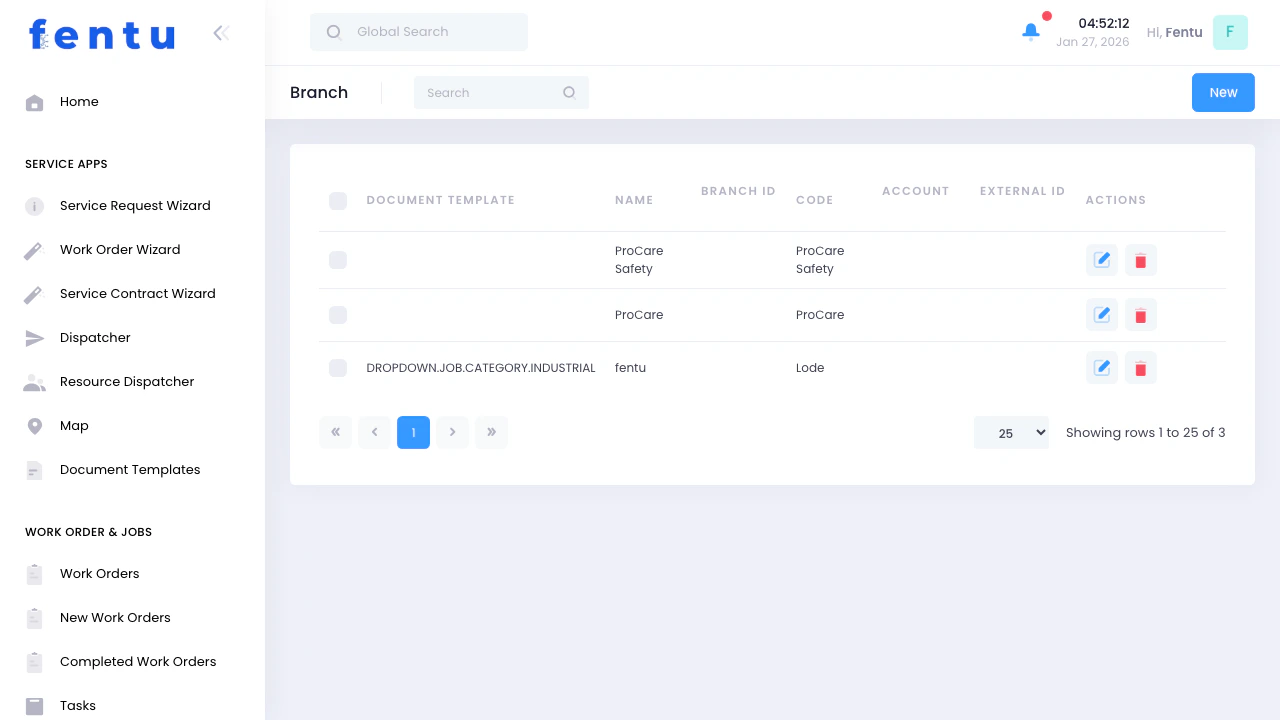
Branches represent your service locations, regional offices, or operational centers. They help you organize work, technicians, inventory, and resources by geographic area or business unit.Branches enable multi-location management, allowing you to track work, resources, and performance separately for each service location.
When to Use Branches
Use branches when:- Multiple service locations - You operate from different offices or depots
- Regional operations - Serving different geographic areas
- Franchise or dealer network - Independent locations under one system
- Warehouse management - Separate inventory locations
- Performance tracking - Analyzing productivity by location
- Resource allocation - Assigning technicians and vehicles to specific areas
Branch Information
Each branch displays:Using Branches in Daily Operations
Work Order Assignment
Branches determine:- Which work orders belong to which location
- Default branch for new work orders
- Filtering and reporting by location
- Resource availability by branch
Resource Management
By Branch:- Technicians: Assigned to specific branches
- Vehicles: Located at and dispatched from branches
- Tools: Equipment inventory by location
- Parts: Warehouse and stock by branch
Filtering by Branch
Throughout the system, you can filter by branch:Work Orders View
- Show only work orders for a specific branch
- View all branches or select one
- Compare workload across branches
- Track completion rates by location
Technician Schedules
- See technicians assigned to each branch
- Schedule work within branch service areas
- Monitor capacity by location
- Balance workload across branches
Inventory Management
- View parts stock by branch
- Transfer inventory between branches
- Track usage by location
- Order for specific branches
The branch filter appears at the top of most views. Select a branch to see only data relevant to that location.
Managing Branches
Creating Branches
1
Go to Branch Management
Navigate to Work Order & Jobs → Branch
2
Click Create
Start new branch record
3
Enter Branch Details
Fill in name, address, contact information
4
Assign Manager
Select the person responsible for this location
5
Define Service Area
Specify geographic region covered
6
Save
Create the new branch
Editing Branches
- Update contact information
- Change branch manager
- Modify service area
- Activate or deactivate branches
- Add notes or special instructions
Branch-Specific Features
Service Areas
Geographic Coverage:- Define territories by postal codes or cities
- Set preferred service regions
- Identify coverage overlaps
- Plan expansion areas
- Estimate travel to common areas
- Plan realistic schedules
- Optimize routing by branch
- Minimize non-productive travel
Performance Metrics
Track by branch:- Work orders completed
- Revenue generated
- Customer satisfaction scores
- Technician productivity
- First-time fix rates
- Response times
Resource Allocation
Technicians per Branch:- View headcount by location
- Identify staffing needs
- Balance workload
- Plan hiring or transfers
- Stock levels at each location
- Fast-moving vs. slow-moving parts
- Transfer needs between branches
- Ordering by location
Multi-Branch Operations
Cross-Branch Work
When to Assign Across Branches:- Branch closest to customer is at capacity
- Specialized skills only available at another branch
- Equipment or parts only at different location
- Customer preference for specific technicians
- Increased travel time and costs
- Coordination between branches
- Parts and tool availability
- Billing and revenue allocation
Branch Transfers
Technicians:- Permanent transfers to different branch
- Temporary assignments
- Updating technician home branch
- Impact on scheduling and availability
- Moving parts between branches
- Stock balancing
- Emergency transfers
- Tracking transfer costs
- Relocating service vehicles
- Temporary loans between branches
- Updating vehicle home location
- Maintenance coordination
Best Practices
Define Clear Service Areas
Define Clear Service Areas
Establish clear geographic boundaries for each branch. Prevents confusion about which branch serves which customers.
Balance Workload
Balance Workload
Monitor work distribution across branches. Redistribute work if one branch is overloaded while another has capacity.
Track Performance Separately
Track Performance Separately
Analyze metrics by branch to identify top performers and areas needing improvement. Fair comparison requires similar service areas.
Coordinate Inventory
Coordinate Inventory
Share stock information between branches. Transfer slow-moving parts from one location to where they’re needed.
Communicate Between Branches
Communicate Between Branches
Share best practices, lessons learned, and successful approaches. Cross-branch communication improves overall performance.
Standardize Processes
Standardize Processes
Use consistent procedures across all branches. Makes training easier and ensures uniform customer experience.
Plan Coverage
Plan Coverage
Ensure adequate coverage for all service areas. Consider peak times, seasonal variations, and growth areas.
Use for Financial Tracking
Use for Financial Tracking
Track revenue, costs, and profitability by branch. Helps identify strong and weak performing locations.
Common Questions
Can work orders have multiple branches?
Can work orders have multiple branches?
A work order is typically assigned to one primary branch, but technicians from different branches can work on it if needed.
Can technicians work for multiple branches?
Can technicians work for multiple branches?
Technicians have a home branch but can be assigned to work in other branch territories as needed.
How do I move work between branches?
How do I move work between branches?
Edit the work order and change the assigned branch. This reassigns the work to the new location’s queue.
What if a customer is between two branches?
What if a customer is between two branches?
Assign to the closer branch or the one with better availability. Some organizations assign by postal code or predefined territories.
How many branches can I have?
How many branches can I have?
No practical limit. Large organizations may have dozens or hundreds of branches across regions.
Can I deactivate a branch?
Can I deactivate a branch?
Yes. Deactivating keeps historical data but prevents new work from being assigned to that branch.
How do branches affect reporting?
How do branches affect reporting?
Most reports can be filtered or grouped by branch, allowing you to analyze performance by location.
Related Documentation
Work Orders
Creating and managing work orders
Technicians
Managing your service technicians
Dispatcher
Scheduling and assigning work by branch
Inventory
Managing parts and materials by location